
On December 31, 2026, OER Commons will be retiring all Open Author resources created in the legacy editor (AKA Open Author 1). This document provides steps that users can take to find and preserve their Open Author 1 materials. Read the official announcement here to learn about our rationale and what to expect, and find instructions on how to preserve your Open Author 1 resources here.
We encourage everyone to read the official announcement linked above for more information. If you have questions about the retirement of Open Author 1.0 resources, please reach out! We'll answer some common questions below.
What exactly is changing?
On December 31st 2026, all resources created in the original Open Author editor (released in 2012) will be removed from OER Commons (oercommons.org). Resources created in Open Author 2 (released in 2016) will not be affected.
What's the difference between Open Author 1 and Open Author 2?
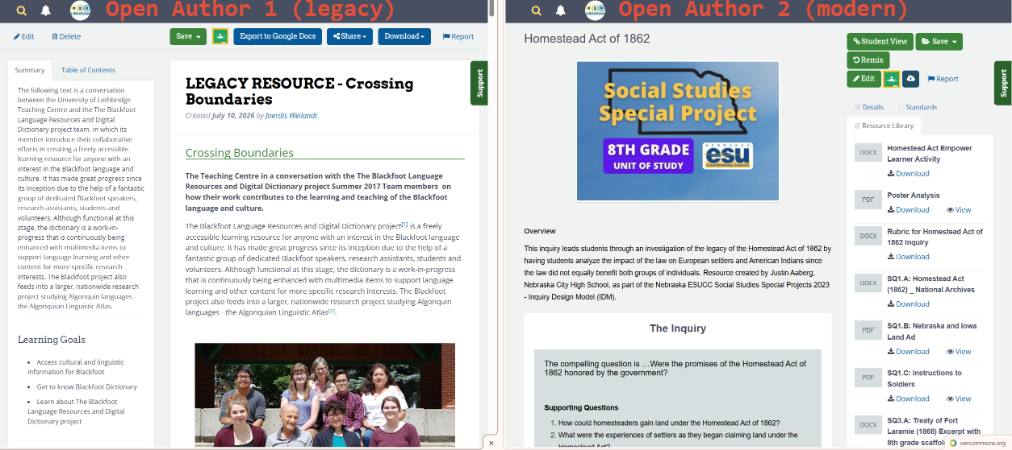
Generally speaking, Open Author 1 (OA1) resources have sections that are not as obviously separated, whereas Open Author 2 (OA2) resources are have sections that more visibly separated. The screenshot below shows resources from both versions of Open Author side-by-side:
Cosmetically, the main differences include:
- button colors (OA1 has mostly blue buttons while OA2 has mostly green buttons),
- the location of the summary/overview (OA1 has the summary on a panel on its left side, OA2 has an overview below a cover image),
- the placement of a side panel (OA1 has a side panel with a summary and table of contents on the left of the resource content, whereas OA2 has a panel to the right containing details, standards, and a resource library).
You can also tell the difference between an OA1 and OA2 resource by looking at its url: an OA1 url shows /authoring/ while an OA2 url shows /courseware/.
Functionally, Open Author 2 resources are more robust than their predecessors. Improvements include:
- Discrete separation of sections within a single lesson, allowing for better document organization
- The ability to include teachers' notes in each section to allow teachers to embed additional context separate from the lesson's content
- A student view that breaks the lesson up into multiple pages and hides teachers' notes, designed especially for embedding in LMS's
- The ability to combine multiple lessons into units, and multiple units into complete courses; units and courses can have their own metadata assigned (note: only OER Commons staff can combine lessons into courses and units at this time -- contact us if you have questions)
How can I tell which resources are being removed?
In addition to the visual differences noted above, OER Commons staff have added "LEGACY RESOURCE" to the titles of Open Author 1 resources make it easier for users to determine which resources will be removed. This also lets users quickly find any Open Author 1 resources in the "My Items" section of a user's account, by searching for the phrase.
What do I have to do?
Most users on OER Commons haven't created any resources using Open Author 1 editor, and don't have any actions to take. In fact, even users who did create resources using Open Author 1 are not required by us to take any actions as part of this process -- converting your materials is completely voluntary. Taking no action will not impact your ability to continue to use OER Commons.
What if I received grant money to make my OER/post it on OER Commons?
We can't answer this question, so we encourage you to review any agreements you entered into as conditions of receiving the grant. If this is a concern, migrating or preserving your resource may be the best way to ensure that the terms of the agreement are satisfied. You can review our guide, How to Preserve Open Author 1 Materials, for more information.
What will happen to my resource's usage statistics?
All metadata (including view and save counts) will be deleted on the end date as well. If you've copied your own authored content from an OA1 resource to an OA2 resource, complete this form to let us know and we'll make every effort to transfer any metadata from the original to the new version.
How will people find my new resource after I copy it into an OA2 lesson, if they bookmarked the previous URL?
If you've copied your own authored content from an OA1 resource to an OA2 resource, complete this form to let us know and we'll make every effort to set up a redirect at the old URL to the new one.
More questions and answers coming soon... !